

Choose Overlay or NOT below. When you are finished, save and publish the page.
nocolor
We’re Upgrading to Serve You Better!
In August 2025, we will be upgrading our banking technology and digital services to continue delivering the same great service.
See below for more details regarding our upcoming System Upgrade on August 15-18.
Upgrade Weekend Overview
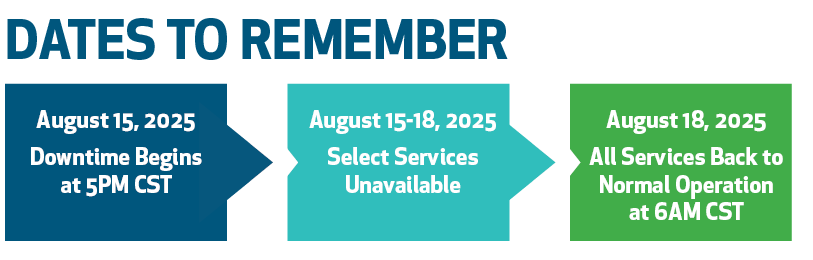
We’re upgrading our core banking system and digital banking experience from close of business on Friday, August 15 through the start of business on Monday, August 18. Several services will be unavailable during this time while we complete important updates.
Key Details:
- Upgrade begins Friday, August 15 at 5 PM
- Full service resumes the morning of Monday, August 18
- Debit and credit cards will continue to work
- Online banking, mobile banking, phone banking, and United Bank ATMs will be unavailable
We appreciate your patience during this scheduled disruption and are here to support you every step of the way.
Important Dates & Action Steps
To minimize any disruption, take the following steps before the upgrade:
Before August 15 at 5 PM:
- Confirm that we have your current email, mailing address, and phone number
- Download any eStatements or transaction details you may need
- Schedule Bill Pay payments or account transfers in advance
- Export your transaction data from digital banking into Quicken or QuickBooks
Accessing Your Accounts After the Upgrade
Starting Monday, August 18, you’ll access your accounts through our upgraded online and mobile banking platform.
For Existing Users:
- Visit UnitedBank.com or open the United Bank Digital app
- Log in using your current username
- Be prepared to enter personal or business identifying information as requested during enrollment
- Do not select “First Time User? Enroll Now.”
- Follow the prompts to create a new password
- Use your new password for both online and mobile banking.
First-Time Users:
- Select “Enroll” and be prepared to enter personal identifying information, such as your account number, email and phone number
- Follow the steps to complete your enrollment and set up your new login credentials
Once Logged In:
- Re-enroll in Mobile Check Deposit
- Enroll or re-enroll in eStatements (final instructions to be updated prior to launch)
New Digital Banking Features
Our upgraded digital banking service is designed to make managing your money easier and more personalized.
Key Features:
- Secure login with fingerprint, Face ID, or PIN
- Real-time balances and detailed transaction history
- Mobile check deposit
- Schedule payments and send money with Bill Pay and person-to-person transfers
- Organize transactions with tags, notes, and images
- Customize your dashboard layout
Download the new app on or after August 18: United Bank Digital
Account & Statement Updates
As part of the upgrade, some account names, terms, and statement dates are changing.
- Personal account statements will now be issued on the 15th of each month
- Non-personal account statements will continue to be issued at month-end
Quick Help & Support Options
We're here to help if you have questions before, during, or after the upgrade.
Support Hours:
- Branches: Monday–Friday, 9 AM–4 PM
- Contact Center: Monday–Friday, 8 AM–5 PM
Call 251-446-6000 or 800-423-7026 - Reach Out to Us on our Contact Us Page
Need Help? We’re Here for You
- Questions about the upgrade
- Assist with any re-enrollments
- Help with password resets or login issues
- Provide mobile app support
Good to Know
See the quick answers below that cover common questions regarding the System Upgrade.
Q: Will my debit and credit cards work during the upgrade?
A: Yes. Cards will continue to work throughout the weekend.
A: Yes. Cards will continue to work throughout the weekend.
Q: Do I need to download a new app?
A: Yes. Search for United Bank Digital in your app store on August 18 or after.
A: Yes. Search for United Bank Digital in your app store on August 18 or after.
Q: Will my Bill Pay information carry over?
A: Yes. Scheduled payments and payees will remain intact.
A: Yes. Scheduled payments and payees will remain intact.
Q: Will my transaction history be saved?
A: Yes. Transaction history will carry over, but past eStatements may be temporarily unavailable. Download any eStatements or transaction details you may need.
A: Yes. Transaction history will carry over, but past eStatements may be temporarily unavailable. Download any eStatements or transaction details you may need.
Q: What happens to BankLine phone banking?
A: You’ll need to re-enroll and set up a new PIN. On August 18 or after, call 251-368-7979 or 800-861-8752 to get started.
A: You’ll need to re-enroll and set up a new PIN. On August 18 or after, call 251-368-7979 or 800-861-8752 to get started.